using CitableImage
baseurl = "http://www.homermultitext.org/iipsrv"
root = "/project/homer/pyramidal/deepzoom"
service = IIIFservice(baseurl, root)
IIIFservice("http://www.homermultitext.org/iipsrv", "/project/homer/pyramidal/deepzoom")You can use URN references to embed images in Web pages.
Instantiate a IIIF service:
using CitableImage
baseurl = "http://www.homermultitext.org/iipsrv"
root = "/project/homer/pyramidal/deepzoom"
service = IIIFservice(baseurl, root)IIIFservice("http://www.homermultitext.org/iipsrv", "/project/homer/pyramidal/deepzoom")Format the request for inclusion in a markdown document. Here, we’ll use the optional height parameter to set the result image’s size in pixels.
using CitableObject
img = Cite2Urn("urn:cite2:hmt:vaimg.2017a:VA012RN_0013")

mdembed = markdownImage(img, service; w = 200)""using Markdown
mdembed |> Markdown.parse
We need an additional parameter for the ImageCitationTool to link to. In this exmaple, we’ll opt to include both a height in pixels and a caption to embed in the markdown.
ict = "http://www.homermultitext.org/ict2/?"
embedwlink = linkedMarkdownImage(ict, img, service; w=100, caption="folio 12 recto")"[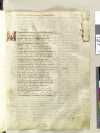](http://www.homermultitext.org/ict2/?urn=urn:cite2:hmt:vaimg.2017a:VA012RN_0013)"embedwlink |> Markdown.parse
The output is linked to the configured image citation tool.
Format the request for inclusion in an HTML document. Here, we’ll use the optional height parameter to set the result image’s size in pixels.
htmlimg = htmlImage(img, service; w = 200)"<img class=\"citeImage\" alt=\"image\" src=\"http://www.homermultitext.org/iipsrv?IIIF=/project/homer/pyramidal/deepzoom/hmt/vaimg/2017a/VA012RN_0013.tif/full/200,/0/default.jpg\" />"